Labeler Projects & Assignments
Labeler projects let you track work done by labelers — a restricted role for external contributors such as data-labeling or annotation contractors. A labeler sees none of your workspace: no roadmap, tracker, CRM, or wiki. They sign in to a dedicated view containing only the labeler projects you assign to them, where they log time and completed work units against each project.
How the pieces fit together
- A labeler project represents a body of work — for example, “Sample Company — Spreadsheet A”. Each project has a unit label describing what one unit of work means for it: “rows”, “images”, “calls”.
- An assignment connects one labeler to one project. Each labeler has at most one assignment per project, and all of their logged work hangs off that assignment — so hours and units are always attributable to a specific person on a specific project.
- Work entries come in two kinds: time (a live timer or a manual entry like “3.5 hours on Tuesday”) and units (“200 rows, spreadsheet A rows 1–200”). Both belong to the labeler who logged them; labelers never see each other's work.
Inviting a labeler
- Go to Settings → Team and send an invite with the Labeler role. There are no app-access checkboxes for labelers — the role itself defines what they can reach.
- When they accept, signing in takes them straight to their labeler view. Until you assign them to a project, it explains that their admin will assign work when it is ready.
You can also switch an existing member to the Labeler role from the team page — the restriction takes effect within about a minute. See Managing Members & Roles for the full role comparison.
Creating projects and assigning labelers
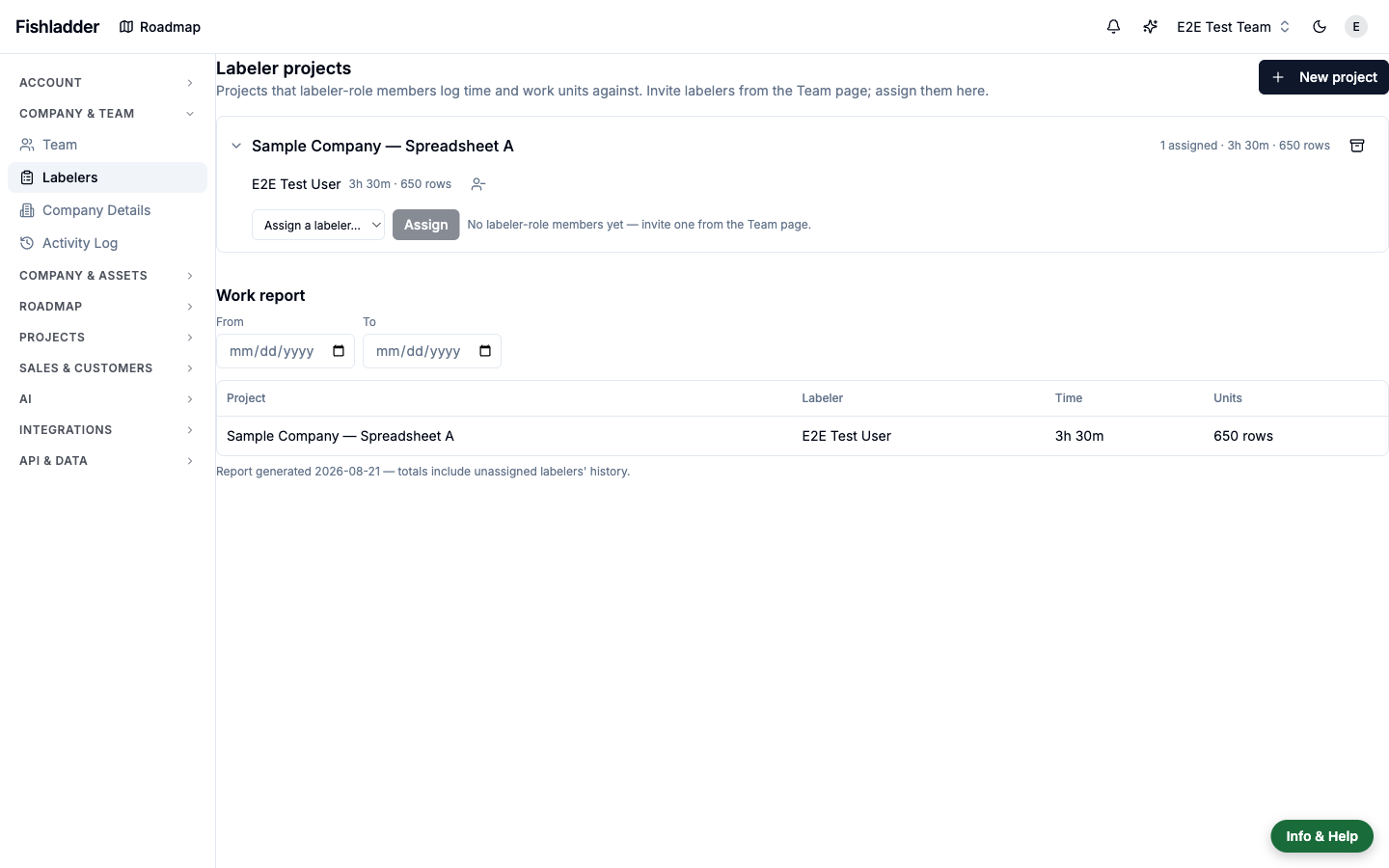
Everything is managed from Settings → Labelers (admins only):
- New project — name it, set the unit label, and optionally describe the work.
- Expand the project and assign labelers from the dropdown, which lists your labeler-role members. Assigning the same person again after an unassignment simply reactivates their assignment.
- The same row shows each assignee's logged hours and units, and the project row totals them across everyone.
What the labeler sees
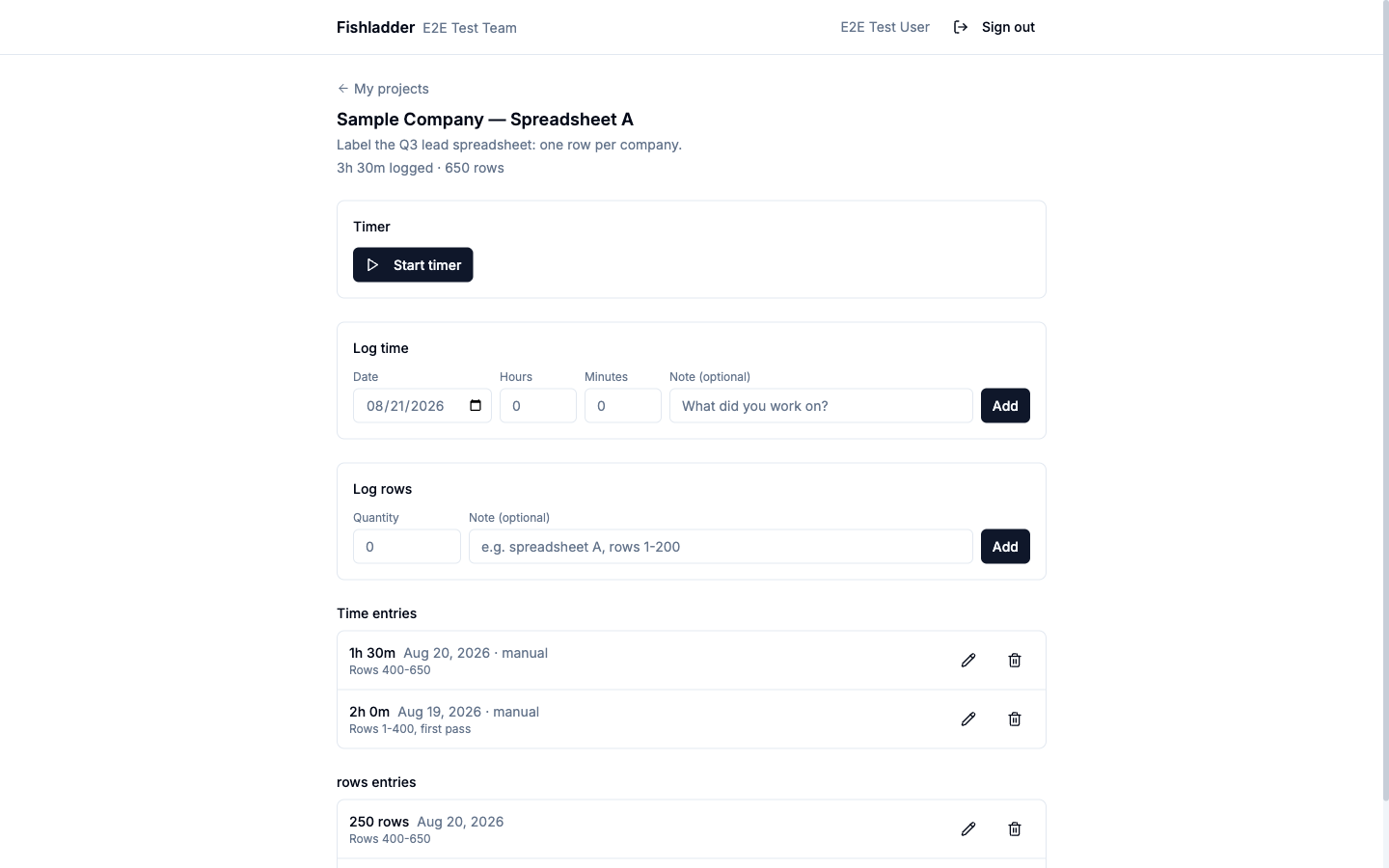
A labeler's home lists their assigned projects with their own totals. Opening a project gives them:
- Timer — start and stop as they work. Each labeler has one running timer at a time; starting a timer on another project stops the first.
- Log time — manual entries with a date, duration, and note, for backfilling work done away from the timer. Entries can be edited or deleted later.
- Log units — a quantity in the project's unit label plus an optional note describing which slice of work it covers.
Unassigning, re-assigning, and archiving
- Unassigning a labeler hides the project from them and stops any timer they had running on it — but their logged history stays in your reports permanently. The assignments list shows them struck through with their totals intact.
- Re-assigning the same labeler reactivates the assignment; new work accrues alongside the earlier history.
- Archiving a project hides it from every assigned labeler and stops all running timers on it. Projects are archived rather than deleted, so the record of who did what is never lost. Unarchive at any time to resume work.
Reporting
The Work report at the bottom of Settings → Labelers sums hours and units per project and per labeler, with an optional date range — useful for invoicing periods or paying contractors. Totals include the history of unassigned labelers, so a report for March is still accurate in August.
Tasks, and work sent by a labeling platform
Besides time and unit counts, a labeler project can hold tasks: discrete pieces of work with a status (assigned, in progress, done, rejected), a quantity in the project's unit, and an optional duration. Labelers see their tasks on the project page and on their My work home, where they can start, finish, and reopen them. Only a manager or the sending platform can mark a task rejected.
A third-party labeling platform can push tasks and log time or units on a labeler's behalf through the API, using a team API key and naming the labeler by email. Re-sending a batch updates the existing tasks rather than duplicating them. See the API reference (Labeler work tracking) and the CLI (fish labeler …).
Project managers
Admins manage every labeler project. To let a non-admin review a project's labelers, expand the project and add them under Managers. Only members can be managers; viewers and labelers cannot. A manager sees the Labelers page with just their projects, can run the report and review, and can correct work history. Creating projects and assigning labelers stay with admins.
Reviewing and correcting work
The Review section below the report rolls the period up per labeler (hours, units, tasks done, task units, units per logged hour, open tasks) and per project. Click a labeler to see their tasks, time entries and unit entries for the period. Each entry can be edited or deleted, and Add entry records time, units or a task on their behalf. Every addition, correction and deletion is written to the Activity Log under the manager's name, with the previous values.
What labelers cannot do
Labelers cannot open any other part of Fishladder — modules, settings, search, the API, or AI features all refuse the role. They can view public share links and this help center, sign out, and nothing else. If someone needs broader access, change their role on the team page instead.